Clear AI agent caches on Mac
AI Agent Clean finds indexes, logs, and stale caches under ~/Library — grouped by Cursor, Claude/Claude Code, Codex, Open Design, GitHub Copilot, Windsurf, Grok, OpenWork, OpenCode, Gemini CLI, and Cline — so you can preview size before anything moves. Review every selected path and preserve sessions, credentials and unknown state.
Last updated: 2026-09-30 · v1.0.8 · macOS 14+
View on the Mac App StoreWhat’s new in 1.0.8 — Language choices
Version 1.0.8 adds German, Hebrew, Japanese and Korean interface previews with English fallback, menu-bar language synchronization and simpler settings. Read the 1.0.8 notes. For historical changes, see version 1.0.5 notes and version 1.0.4 notes. Current trial eligibility, available offers, and payment terms are shown in the Mac App Store.
AI tools eat disk space silently
AI tools can store caches, logs, configuration and local state under ~/Library or home dotdirs. Their locations and contents vary by client and version. A Grok browser session and a third-party desktop client should not be treated as the same storage layout.
Cache size varies by tool version and workload — measure on your own Mac before removing anything. Do not rely on generic “GB saved” claims. Review the detected paths and selected items before cleanup. Preserve sessions, credentials, configuration and unknown local state; a detected location is not a guarantee that its entire contents are disposable.
Step-by-step manuals: Clear Cursor cache · Clear Copilot cache · Clear Windsurf cache · Clear Gemini CLI cache · Clear Claude Desktop cache · Clear Codex cache and logs.
AI Agent Clean — grouped, previewed, recoverable
Run AI Agent Clean as a standalone scan or inside Smart Scan. Results appear by tool and data type — indexes, logs, crash reports, update caches — with size totals before you confirm.
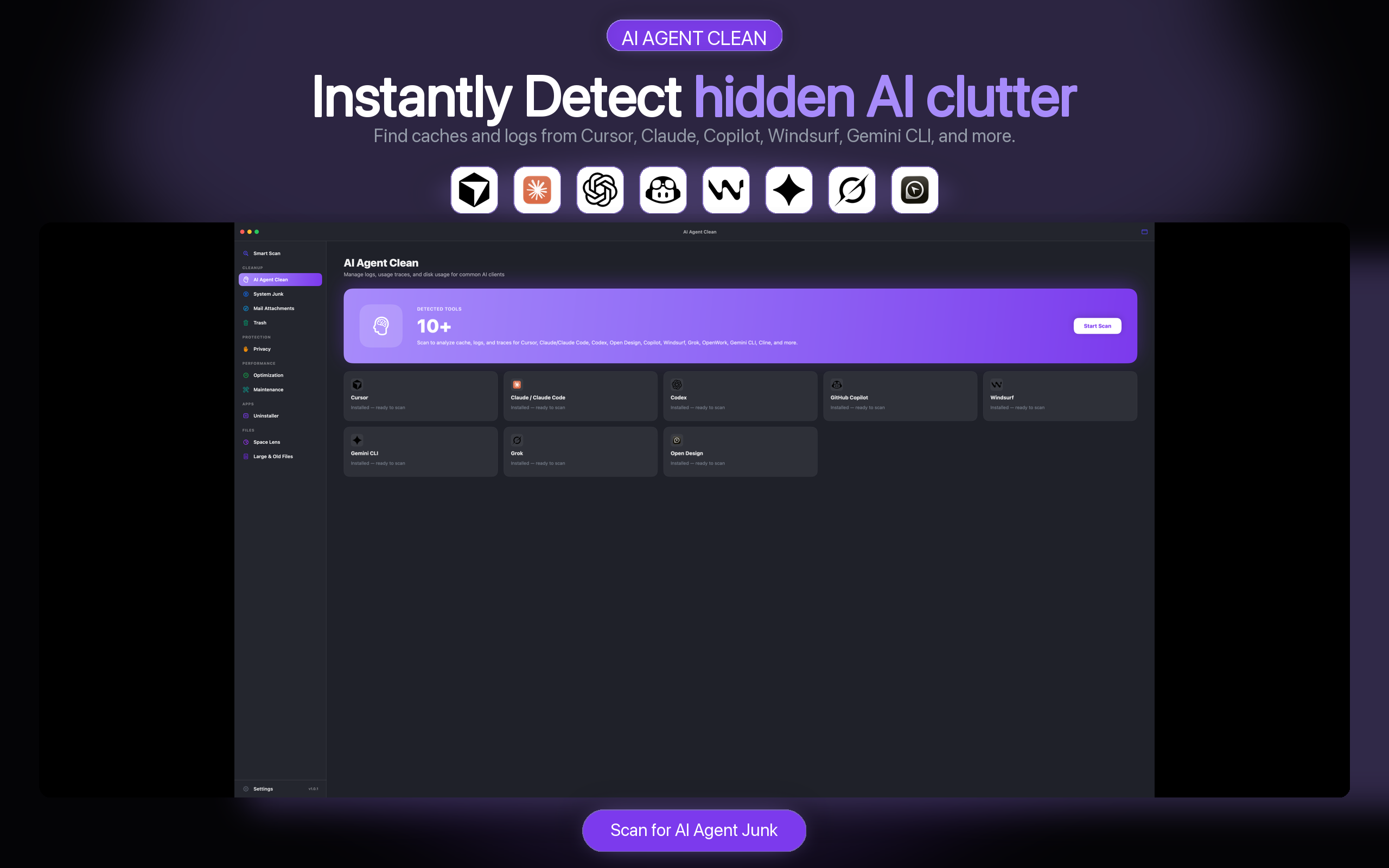
- Per-app groups — Cursor, Claude/Claude Code, Codex, Copilot, Windsurf, Grok, OpenWork, and more.
- Category labels — caches vs logs vs conversations (off by default).
- Version-safe paths — legacy + current layouts so upgrades don’t cause mistaken deletes.
- Trash by default — regenerable caches only; sessions/credentials protected.
Safe cleanup for developers
- No cloud upload — scan and preview stay on your Mac.
- Regenerable targets — focuses on caches and logs, not your source repos.
- Protected paths — auth, settings, MCP, skills, and install trees are excluded.
- No auto session wipe — conversations require explicit selection and confirmation.
AI Agent Clean FAQ
Will cleaning Cursor cache break my projects?
Caches and indexes are rebuilt automatically. Your project files in ~/Projects or your repo folders are not targeted. After cleanup, Cursor may re-index on next launch — expect a one-time delay.
Which tools are supported?
Cursor, Claude/Claude Code, Codex, Open Design, GitHub Copilot, Windsurf, Grok, OpenWork, OpenCode, Gemini CLI, and Cline — plus DeepSeek, GLM, and Kimi. Use Deep Scan when you need leftovers Standard misses. See What’s New in 1.0.8.
Can I clean manually instead?
Yes — see our guide. AI Agent Clean automates discovery and grouping so you spend less time in Application Support.
Is AI Agent Clean included in Smart Scan?
Yes. Smart Scan runs AI Agent Clean as one of its modules, or you can launch it directly from the sidebar.
Find a storage review guide by AI tool
Identify the desktop app, CLI or editor extension before inspecting storage. Start with the guide for your tool; the absence of a guide is not permission to delete its data.
- Grok on Mac: storage and cache review
- Cursor storage review guide
- Claude Desktop storage review guide
- Codex storage review guide
- GitHub Copilot storage review guide
- Windsurf storage review guide
- Gemini CLI storage review guide
For OpenCode, OpenWork, Cline, Grok and Open Design, inspect the categories actually shown by your installed app version. Keep projects, sessions, credentials and unknown files. See the version-scoped OpenCode reference below.
AI developer storage reference: files to keep
This reference distinguishes configuration and sign-in data from disposable cache. It covers Codex, Claude Code and version-scoped OpenCode records; it is not a list of safe deletion targets or a Claude Desktop path map.
- Codex — project configuration
.codex/can contain project-levelconfig.toml. Category: configuration. Keep the directory; never auto-select it for cleanup.- Codex — user configuration
~/.codex/config.tomlstores user configuration. Category: configuration. Keep; never auto-select.- Claude Code — user settings
~/.claude/settings.jsonstores user settings. Category: configuration. Keep; never auto-select.- Claude Code — sign-in and project state
~/.claude.jsoncontains preferences and state including authentication-related data. Category: credentials/authentication. Keep; never auto-select.- OpenCode V2 — configuration and persistent data
- Keep global configuration at
~/.config/opencode/opencode.jsonoropencode.jsonc. V2 documentation places the default database at~/.local/share/opencode/opencode.db, with anOPENCODE_DBoverride. Do not treat the database or service state as disposable cache.
OpenCode V2 sources, reviewed September 23, 2026: configuration and troubleshooting and database protection. Do not mix V1 and V2 layouts. This is documented-purpose evidence, not a Mac deletion/recovery test or certification of AI Agent Clean runtime protection.
Sources, method and limits
Evidence: vendor-documented purpose, reviewed September 23, 2026 against Codex configuration documentation and Claude Code settings documentation. The keep rules are our conservative editorial guidance, not a claim that a vendor tested deletion.
Tool versions and macOS test version: not recorded. Deletion and recovery tests: not performed. AI Agent Clean release context: 1.0.8; these records do not certify its runtime behavior. Paths may change or be overridden; check your installed tool’s settings. Unknown paths remain unclassified and should be kept.
Updated September 23, 2026: first four documented protection records. We publish no per-path pages. Future changes require a source review; a deletion-test claim also requires tool and macOS versions, a reproducible procedure and recovery evidence.
Continue with the Codex guide or the Claude Desktop and Claude Code distinction.
View plans on the Mac App Store
Scan free. Check trial eligibility, available offers, and current terms in the Mac App Store.